
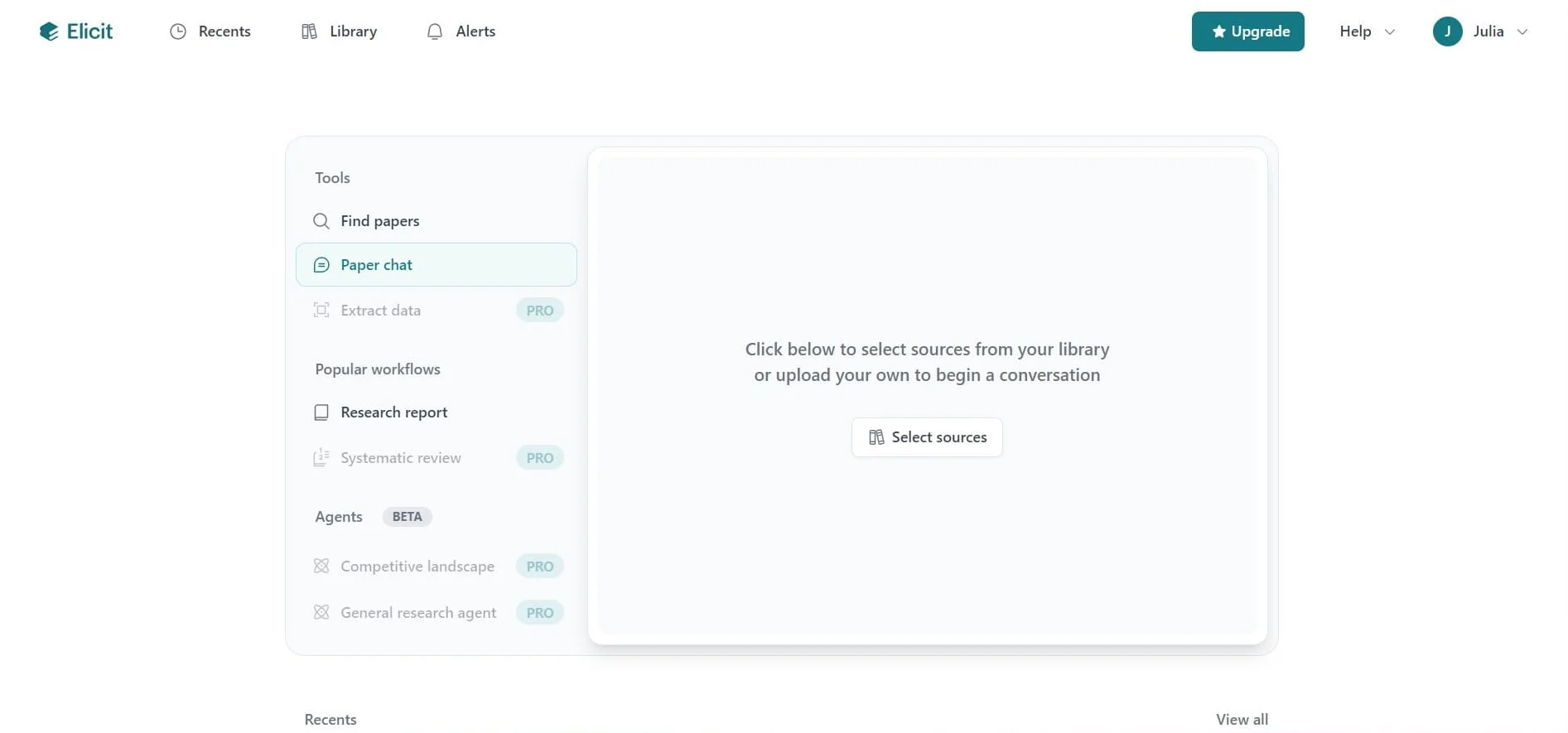

Are you drowning in a sea of PDFs? In the modern academic landscape the information overload has become a structural hurdle. Researchers are spending 70% of their time filtering data rather than synthesizing insights. This is where Elicit AI Steps in as a transformative solution for academic papers screening.
As a specialized research agent, it can help you find papers efficiently. An AI research assistant and research tools can enhance your workflow. Elicit doesn’t just “chat” like a standard chatbot; it’s a sophisticated engine designed for literature review automation and evidence synthesis.
If you are looking to move beyond simple keyword searching and streamline your academic workflow. In this guide we will show you exactly how to use Elicit AI for research summarization to save dozens of hours. It helps to maintain the highest levels of academic rigor.
What is Elicit AI and Why is it a Game-Changer for Research?
Unlike general-purpose LLMs like ChatGPT, developers designed Elicit AI specifically for the scientific community.” The core of its technology leverages AI tools for improved efficiency. Semantic search across a massive database of over 125 million academic papers, sourced primarily from Semantic Scholar and PubMed.
Semantic search is fundamentally different from traditional Boolean searching. It identifies papers based on the conceptual meaning of your query rather than exact word matches. For example, a search for “mental fatigue” will successfully retrieve papers discussing “cognitive load” or “burnout”. Even if those specific terms weren’t in your original query.
For those focusing on academic papers, using a research agent can be beneficial. Research summarization, Elicit’s primary value lies in its transparency and “source-first” architecture. Sentence-level citations back every claim made by the AI. This means that instead of trusting the AI’s memory, you are provided with direct links to the specific lines in a PDF. It allows you to verify findings instantly without hunting through 30-page documents.
Key Benefits of Elicit for Summarization:
- High Precision & Verification: By grounding its answers in a closed loop of verified papers, Elicit drastically reduces the risk of “hallucinations” (making up facts) that plague general AI. Impact: This ensures your literature review is built on a foundation of factual, peer-reviewed evidence.
- Structured Data Extraction: It doesn’t just provide paragraphs of text; it automatically builds a research matrix. It allows you to compare methodologies, participant demographics, and statistical results across dozens of studies simultaneously.
- Workflow Integration: Elicit automates the initial “triage” phase of a systematic review workflow. It helps you to identify which papers are worth a deep read and which can be safely discarded based on their summarized abstracts.
Step-by-Step Guide: How to Use Elicit AI for Research Summarization
Navigating Elicit is intuitive, but mastering it requires a structured approach to ensure you don’t miss critical nuances in the data. Follow these steps to generate high-quality, publishable summaries using research tools.
Step 1: Crafting the Perfect Research Question on Elicit AI
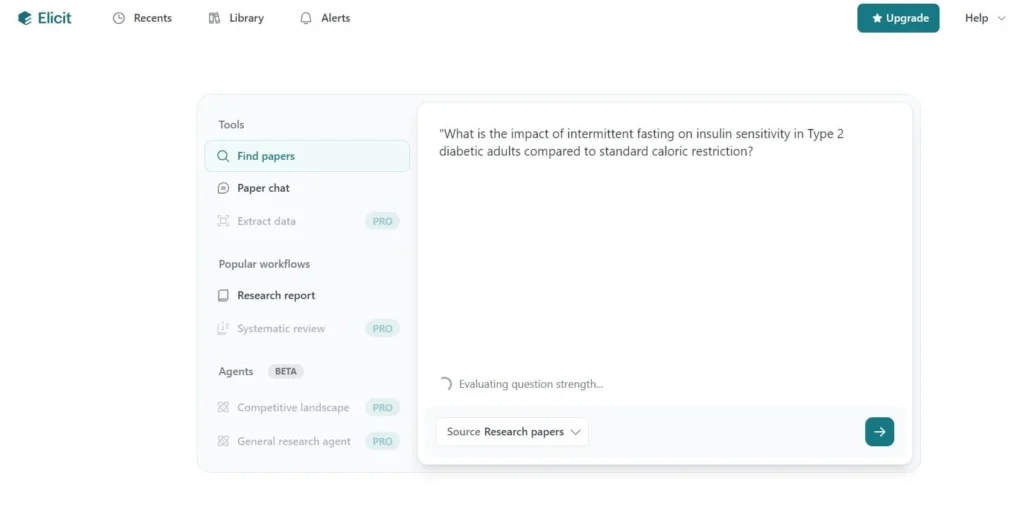
The quality of your summary is directly proportional to the precision of your input. General queries yield general results. Instead of searching for “diabetes treatments,” use the PICO framework (Population, Intervention, Comparison, Outcome) to structure your query. A well-formatted PICO prompt helps Elicit’s NLP algorithms immediately filter for the highest relevance.
- Example: “What is the impact of intermittent fasting on insulin sensitivity in Type 2 diabetic adults compared to standard caloric restriction?”
Pro Tip: As you type, Elicit will offer suggestions to refine your question. Pay attention to these prompts, as they often help narrow your scope to specific study types (like longitudinal studies vs. cross-sectional) before you hit “Generate.”
Step 2: Filtering and Selecting the Right Papers on Elicit AI
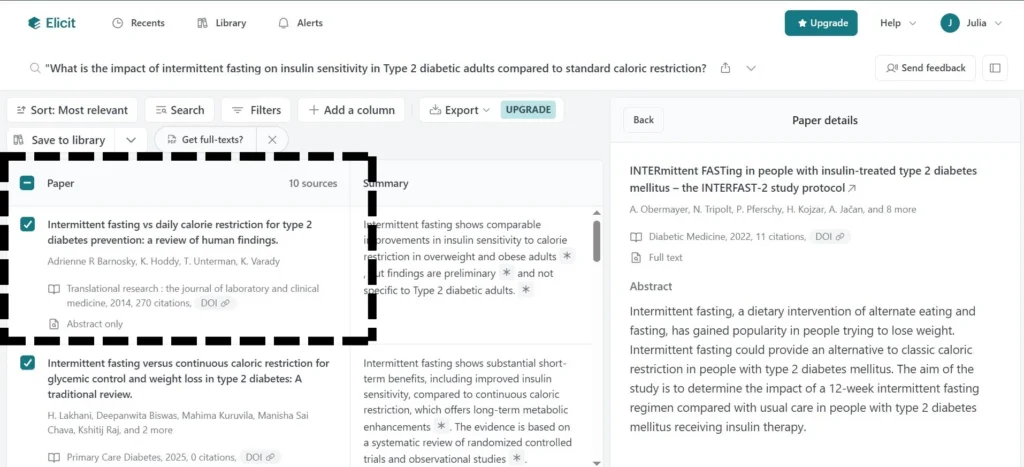
Once you enter your question, Elicit retrieves the most relevant papers. However, “relevance” is subjective, so you must use the sidebar filters to refine the selection:
- Filter by Year: Essential for fast-moving fields like AI or immunotherapy, where data from three years ago may already be obsolete.
- Study Type: You can filter specifically for Randomized Controlled Trials (RCTs) to find high-level clinical evidence, or Systematic Reviews to find existing summaries of the field.
- Manual Selection: Summarization works best when you curate the 8 most relevant papers for your research. Tick the boxes for the papers that most closely align with your intent to ensure the final report doesn’t include “noise” from tangentially related studies.
Step 3: Generating the “Research Report” on Elicit Ai
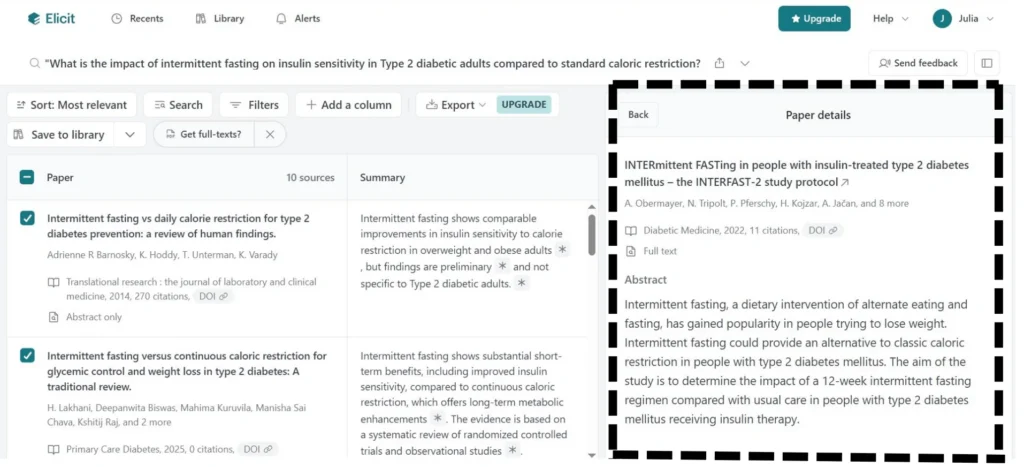
This is Elicit’s “superpower.” By selecting the Research Report workflow, the AI conducts a mini-systematic review. It doesn’t just summarize papers individually; it synthesizes them. It analyzes the top 10 (or up to 80 on Pro plans) papers and writes a cohesive narrative of the collective findings from a million Semantic Scholar papers.
Each statement in the report is hyperlinked. If the report says, “Refer to the data extracted from the academic papers,” it emphasizes the importance of thorough screening. “Intermittent fasting showed a 12% increase in insulin sensitivity,” according to the findings from several academic papers. You can click the citation to see the exact table or sentence in the original paper that provided that number. This feature helps you to find papers effectively. This level of citation verifiability is what makes Elicit acceptable for academic use.
Step 4: Customizing the Research Matrix (Data Extraction) on Elicit AI
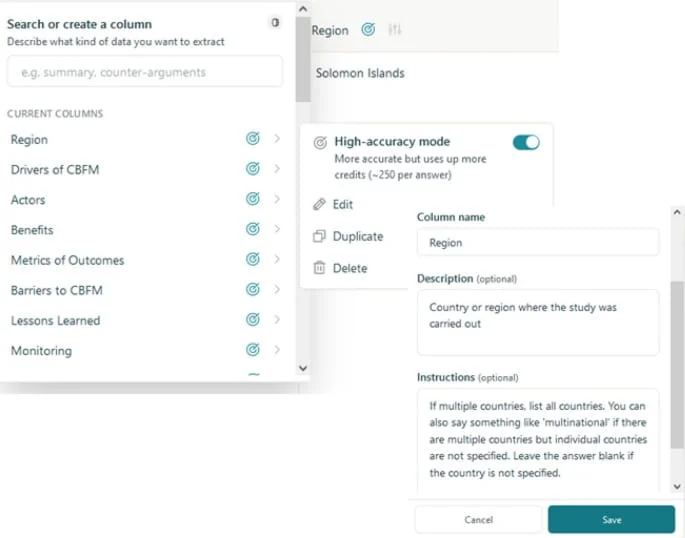
Summarization isn’t just about reading text; it’s about comparing data points. Use the Extract Data from academic papers to enhance your research output. A feature to add custom columns to your results table. You can ask Elicit to extract:
- Population size (N=) is crucial when analyzing data from millions of papers. To quickly gauge the power of a study.
- Methodology/Intervention details: To see exactly how a study was conducted.
- Limitations & Gaps: To find “future research” directions for your own papers.
- Main Outcomes/Statistical Significance: To identify which studies found a positive effect.
This creates a side-by-side comparison matrix. Instead of flipping back and forth between browser tabs, you can see how Paper A’s methodology differs from Paper B’s at a single glance. This matrix serves as the perfect skeleton for the “Literature Review” or “Related Works” section of a manuscript.
Advanced Features: Chatting with Papers and PDF Uploads
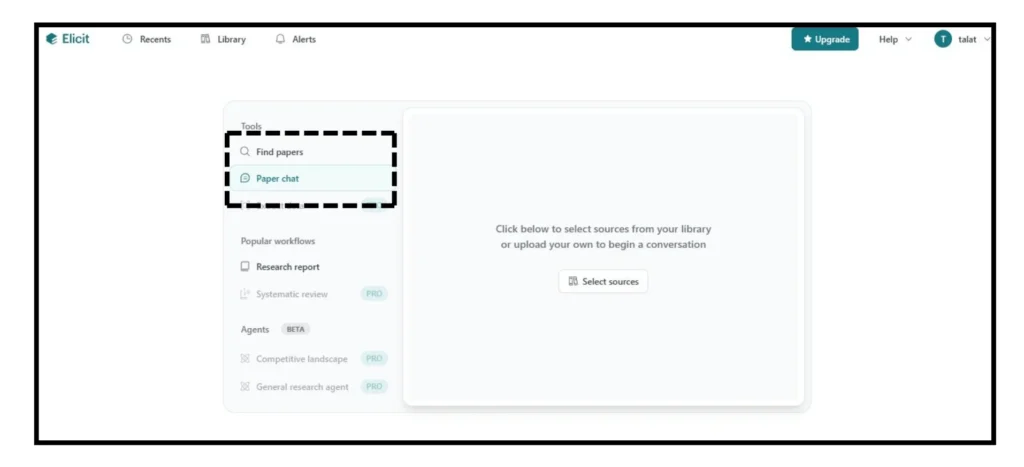
Elicit also caters to researchers who have already done their initial searching and are sitting on a massive library of documents.
- Upload Your Own PDFs: You can bypass the Elicit search engine by uploading your Zotero library. This is particularly useful for synthesizing papers you have already pre-screened in your reference manager. Elicit will then apply its Extract Data and Paper Chat features to only the content you provided. As it act as a high-powered search and summary layer for your existing personal database.
- Paper Chat (Multi-Paper Synthesis) utilizes AI tools to analyze multiple academic papers. Engage in a deep dive with up to 8 papers simultaneously. You can ask complex, comparative questions like, “What are the common methodological gaps mentioned across these four studies regarding sample diversity?”. Elicit will cross-reference the texts and synthesize a multi-source answer, complete with comparative citations.
Elicit AI vs ChatGPT: Why Specialized AI Wins for Academics
While ChatGPT is an excellent tool for brainstorming or improving the flow of your writing, it is fundamentally a “generative” model, whereas Elicit is an “extractive” and “evaluative” model. The difference is critical for research:
- Sources are Real: Every paper in Elicit is a real, indexed document with a DOI, making it easier to track millions of papers. ChatGPT has a known history of “hallucinating” plausible-sounding but non-existent citations.
- Domain Specificity: Elicit is trained to understand scientific nuances, such as the difference between a “statistically significant” result and a “clinically meaningful” one.
- Context Retention: Elicit maintains the context of the entire PDF, whereas general LLMs often have “context windows” that might cut off a paper’s crucial “Limitations” section or supplementary data.
Conclusion: Elevating Your Research Workflow
Mastering Elicit AI is about more than just working faster; it’s about increasing the depth and accuracy of your work. By automating the mechanical, tedious aspects of research summarization and data extraction, you free up your cognitive resources for the high-level tasks that AI cannot do: critical analysis, identifying nuanced contradictions in evidence, and creative synthesis.
Whether you are a PhD student tackling a complex thesis or a seasoned professional conducting a systematic review, Elicit AI represents the most robust bridge currently available between the overwhelming sea of academic literature and clear, actionable insights.
Key Takeaways for Effective Literature Review Automation:
Use Elicit for citation verifiability, build a research matrix for side-by-side comparison, and leverage PICO frameworks for better natural language processing results.
Common FAQS About Elicit AI
What is the Elicit AI tool used for?
Elicit is primarily used for automated literature reviews and evidence synthesis. It helps researchers find relevant academic papers without needing perfect keyword matches, summarizes key takeaways, and extracts specific data (like sample sizes or results) into organized tables.
Is Elicit AI free or paid?
Elicit operates on a freemium model:
- Basic Plan: Free to use with limited “credits” for running workflows.
- Plus Plan: The plus plan starts at $10/month for increased limits and higher-quality models.
- Pro: Start at $42/month, offering advanced features like high-volume data extraction and collaborative tools.
- Team Plans: Start at $65/month per user, offering advanced features like high-volume data extraction and several collaborators.
Is Elicit good for research?
Yes, it is excellent. Unlike general AI (like ChatGPT), Elicit is connected to a database of over 200 million academic papers (via Semantic Scholar). It is specifically built to reduce hallucinations by grounding every answer in actual published research, making it a “gold standard” tool for systematic reviews.
What is the purpose of Elicit AI?
The purpose of Elicit is to supercharge research efficiency. It automates “robotic” tasks, such as screening thousands of abstracts or manually copying data from PDFs, allowing researchers to focus on high-level analysis and critical thinking.
How can I use AI for my research?
You can leverage Elicit and similar AI tools to:
- Brainstorm: Generate focused research questions based on a broad topic.
- Search: Find papers using “natural language” (e.g., “What are the effects of X on Y?”) instead of complex Boolean strings.
- Summarize: Get one-sentence summaries of the “main findings” of multiple papers at once.
- Extract: Automatically pull data points from uploaded PDFs into a CSV or Excel-ready format.
Also Read: How Technology Giants Shape Global Security